
空色天絵 / NEO TOKYO NOIR 01

435 字
2 分钟
Taro-微信小程序自定义状态栏适配
背景
navBarHeight使用的是statusBarHeight || 44 像素,在安卓的部分机型上,与小程序菜单按钮上下间距不一致或与菜单按钮重叠。在IOS上则一切正常。
- 动态计算合适的 navBar高度
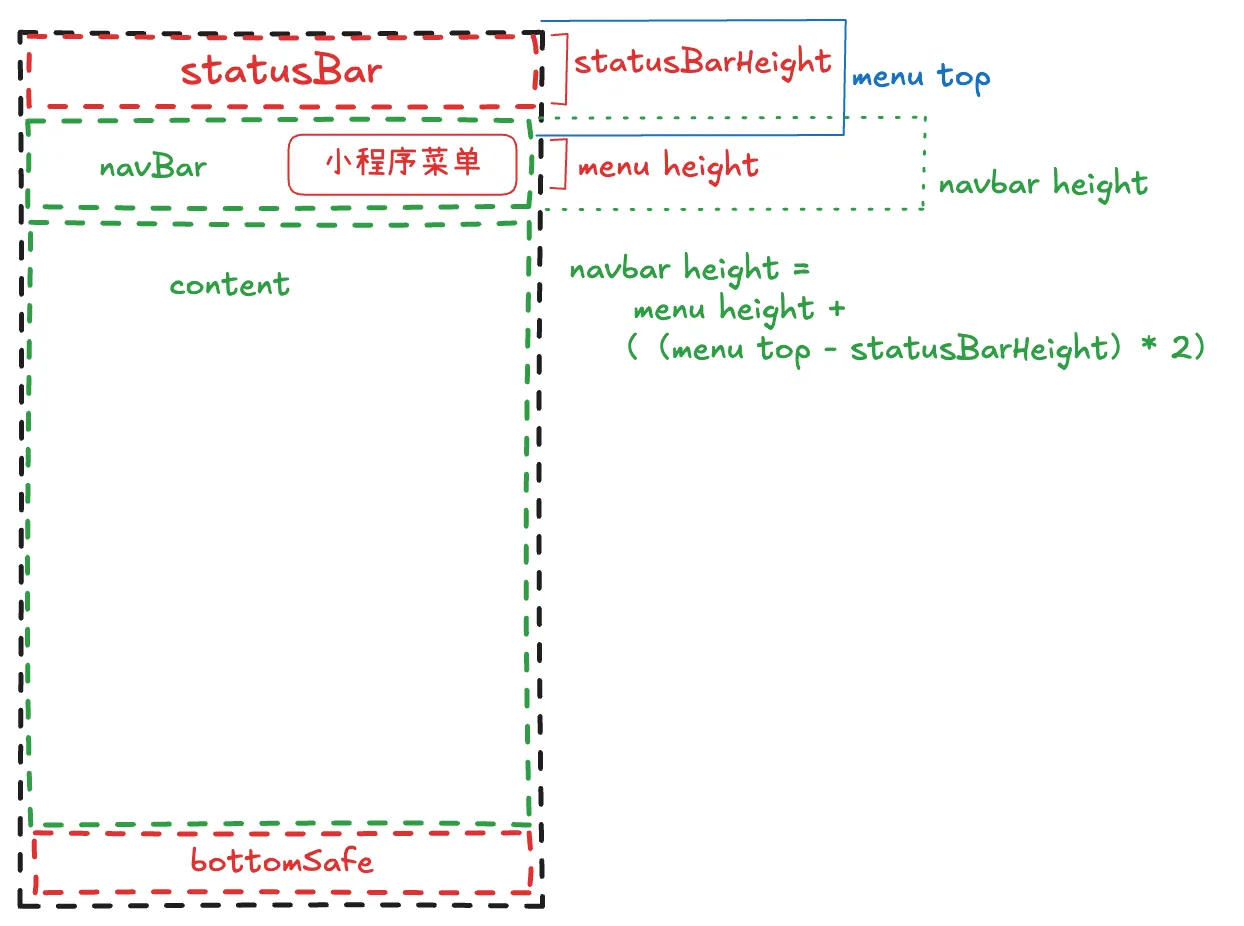
代码
import Taro from '@tarojs/taro'import { useMemo } from 'react'
export default function useSystemInfo() { const menuInfo = Taro.getMenuButtonBoundingClientRect() const { systemInfo, navBarHeight, safeHeight, bottomSafeHeight, statusBarHeight, windowInfo } = useMemo(() => { // 获取的数值单位是px const windowInfo = wx.getWindowInfo(); // 用 const menuButtonInfo = wx.getMenuButtonBoundingClientRect(); let statusBarHeight = windowInfo.statusBarHeight; let navBarHeight = menuButtonInfo.height + (menuButtonInfo.top - statusBarHeight) * 2; let safeHeight = windowInfo.safeArea.height; let bottomSafeHeight = windowInfo.screenHeight - windowInfo.safeArea.height - statusBarHeight;
return { navBarHeight, safeHeight, bottomSafeHeight, statusBarHeight, systemInfo: Taro.getSystemInfoSync(), windowInfo } }, [])
return { menuInfo, systemInfo, windowInfo, navBarHeight, safeHeight, bottomSafeHeight, statusBarHeight }}使用
组件
import useSystemInfo from '@/modules/common/hooks/useSystemInfo'import { View } from '@tarojs/components'import Taro from '@tarojs/taro'import classNames from 'classnames'import { ReactNode, useEffect, useState } from 'react'import './index.scss'
export interface NavBarProps { title?: ReactNode left?: ReactNode onBackClick?: () => void fixed?: boolean placeholder?: boolean background?: string}
export default function NavBar({ background = '#fff', title, fixed = true, placeholder = true, left = <View className="sonic-icon sonic-icon-right-arrow"></View>, onBackClick = () => { Taro.navigateBack() },}: NavBarProps) { const { navBarHeight, statusBarHeight } = useSystemInfo() const [useBackground, setUseBackground] = useState(false) useEffect(() => { if (!fixed || !placeholder || Number.isNaN(navBarHeight)) { return } const observe = Taro.createIntersectionObserver(this, { thresholds: [0], observeAll: false, }) observe .relativeToViewport({ top: 0, }) .observe('.observe-view', (res) => { setUseBackground(res.intersectionRatio < 1) }) return () => { observe.disconnect() } }, [fixed, placeholder, navBarHeight]) return ( <> <View style={{ backgroundColor: background ? background : useBackground ? background : 'transparent', }} className={classNames('nav-bar-container', { 'fixed-top': fixed, })} > <View style={{ height: statusBarHeight }}></View> <View className="nav-bar flex items-center cff fz36" style={{ height: (navBarHeight), }} > {left && ( <View onClick={onBackClick} className="nav-bar-back px-25 py-20"> {left} </View> )} <View className="nav-bar-title text-overflow tx-c f36 c00 "> {title} </View> </View> </View> {placeholder && ( <View className="placeholder"> <View style={{ height: statusBarHeight }} /> <View style={{ height: navBarHeight }} /> </View> )} <View className="observe-view" style={{ height: 1 }}></View> </> )}样式 index.scss
.nav-bar-container { width: 100vw; transition: 0.5s background-color; .sonic-icon-right-arrow { transform: rotate(180deg); }
&.fixed-top { position: fixed; left: 0; top: 0; right: 0; z-index: 100; }}.nav-bar-back { position: relative; z-index: 9; color: #000;}
.nav-bar-title { position: absolute; width: 100%;} Taro-微信小程序自定义状态栏适配
https://fuwari.vercel.app/blog/posts/wx-mini/taro-微信小程序自定义状态栏适配/